智慧助眠雙耳節拍 — 由 θ → δ 神經誘導頻率與情境聲景組成的助眠音場, 整合 Apple 健康並能即時偵測您入睡時自動降低音量。
AI-powered binaural beats — sleep-inducing θ → δ frequencies blended with ambient soundscapes. Apple Health integration with real-time sleep detection that gently fades the music when you drift off.
我們把雙耳節拍科學、Apple 健康整合與隱私第一的設計揉在一起,做給真心想睡好的人。 Built on binaural-beat science, Apple Health integration, and privacy-first design — for people who really want to sleep well.
精心調製的 θ → δ 神經誘導頻率,搭配蟬鳴、海浪、雨聲等自然聲景。戴上立體聲耳機,讓兩個略有差異的頻率引導大腦進入放鬆狀態。
Carefully tuned θ → δ frequencies blended with cicadas, ocean waves, and rain. Wear stereo headphones and let two slightly offset tones gently guide your brain into a relaxed state.
自動把你聽音樂助眠的時段存到 Apple 內建的「健康」App,跟 Apple Watch 的睡眠紀錄擺在一起方便你看。資料只在你手機上處理,不上傳雲端。
Each session is saved to the Apple Health app alongside your Apple Watch sleep data, so you can see when you started winding down and when you fell asleep. All data stays on your device.
麥克風與健康資料只在裝置本機處理,不收集、不上傳、不分享給廣告商。本 App 沒有第三方追蹤 SDK。
Microphone and health data are processed entirely on-device — never collected, uploaded, or shared with advertisers. No third-party tracking SDKs.
把神經科學、訊號工程與 AI 適性演算法,濃縮在一支只需要耳機的 App 裡。 Neuroscience, signal engineering, and adaptive AI — distilled into an app that needs nothing more than your headphones.
適性演算法在每段助眠時段中即時校準雙耳載波,從 θ 頻段(~6Hz)漸進過渡到 δ 頻段(<4Hz),呼應自然入睡的生理節律。
Adaptive algorithms recalibrate the binaural carrier in real-time, easing the difference frequency from Theta (~6Hz) toward Delta (<4Hz) to mirror the body's natural sleep-onset rhythm.
連線 Apple Watch 後,App 會即時讀取心率、呼吸率與動作,偵測到你睡著時自動把音量淡出到 30%,陪你安靜一夜。
When paired with Apple Watch, the app reads heart rate, breathing, and motion in real time — and automatically fades the audio to 30% the moment you fall asleep, so it stays quietly with you through the night.
不需要貼片、不需要額外硬體。任何立體聲耳機(罩耳、入耳、AirPods)都能使用,iPhone + 耳機就是全部。
No electrodes, no extra hardware. Any stereo headphones — over-ear, in-ear, or AirPods — will do. Just iPhone and headphones, nothing else to wear.
睡前難以放鬆,常常因為大腦仍處於活躍的高頻 β 波狀態。 NeuroRest 透過雙耳節拍輕柔引導,讓聆聽體驗逐漸往較慢的頻段移動,陪伴你慢慢平靜下來。
It's often hard to wind down when the mind is still humming with high-frequency Beta waves. NeuroRest uses gentle binaural beats to help your listening experience drift toward slower frequency bands, accompanying you as you settle.
當左右耳分別聽到頻率略有差異的純音(例如左 200Hz、右 204Hz),大腦會自然合成一個 4Hz 的差頻感受。多項研究顯示,這類雙耳節拍可能有助於把皮質活動推向差頻所在的頻段。
When each ear receives a slightly offset pure tone (e.g. 200Hz / 204Hz), the brain perceives a 4Hz beat at the difference. Emerging research suggests these binaural beats may help shift cortical activity toward the band of the difference frequency.
一段典型的 NeuroRest 助眠歷程從 θ 頻段(~6Hz)開始,在約 15 分鐘內逐漸滑移到 δ 頻段(<4Hz),貼合自然入睡的生理曲線,讓「躺下 → 入眠」更順暢。
A typical NeuroRest session begins around the Theta band (~6Hz) and slides toward Delta (<4Hz) over roughly 15 minutes, mirroring the body's natural sleep-onset trajectory and shortening the gap between lying down and falling asleep.
入睡儀式應該簡單直覺,我們把它縮短到三個動作。 A sleep ritual should be simple. We boiled it down to three steps.
罩耳式或入耳式都行,AirPods 也可以。雙耳節拍效果只有耳機才感受得到。
Over-ear, in-ear, or AirPods — anything stereo. The binaural effect only works with headphones.
仲夏、海潮、皓月、晚霞等多種情境,挑一個今晚想睡進去的場景。
Midsummer, Tide, Bright Moon, Twilight — pick the place you want to drift into tonight.
App 會在偵測到您入睡時(透過 Apple Watch 心率或麥克風呼吸偵測)自動把音量淡出到 30%,陪伴您一夜好眠。
When the app detects sleep (via Apple Watch heart rate or microphone breathing detection) it automatically fades the volume to 30% and stays with you through the night.
這是我們正在開發的研究模式預覽。未來搭配選配的相容硬體配件時,儀表板會以動畫方式呈現 8 種訊號的同步變化。此功能尚未在 App Store 版本提供。
This is a preview of our research mode currently in development. When paired with an optional compatible accessory in a future release, the dashboard will visualize multi-channel signal flow. This feature is not yet available in the App Store release.
查看研究模擬 View Research Simulation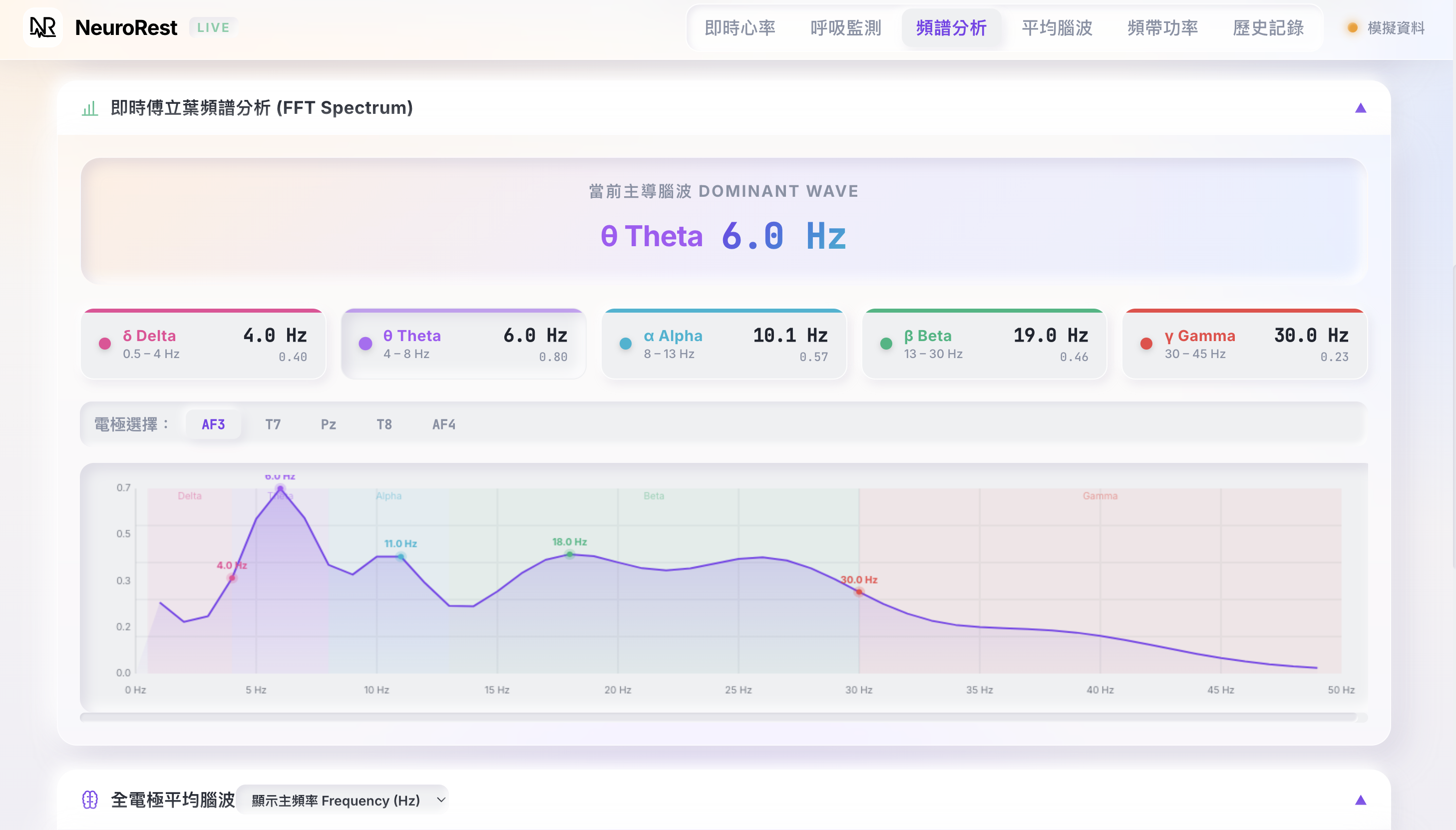
麥克風只在記憶體即時偵測呼吸,從不錄音也不上傳。Apple 健康資料完全在裝置端讀寫。我們不販售資料、不放廣告,沒有任何第三方分析 SDK。
Microphone audio is processed in memory for breathing detection only — never recorded, never uploaded. Apple Health data is read and written entirely on-device. We don't sell data, we don't show ads, and we don't use third-party analytics SDKs.
沒有 iPhone 也沒關係,從瀏覽器就能免費建立帳號開始使用。
No iPhone yet? Create a free account right in your browser and get started.